Amazon
Showing posts with label photography. Show all posts
Wednesday, August 29, 2012
Generations...
One of the best things about being a photographer in a fairly small town is that you get to develop real personal relationships with your clients. And to be a part of their family as their lives go on. This is a story about one local family I've had the pleasure to know and photograph.
I first met this family 5 years ago, when I did the Senior Portraits for the family's oldest son, Joe. His mother came along for the photo shoot, and the photos turned out great. At the time, Joe's sister Kristen was engaged to be married (to Dwayne), and since their mother loved Joe's senior portraits, she hired me to do Kristen's wedding photos (above).
It was a beautiful wedding on the beach in Coronado, CA -- and we got some great pictures of the happy couple.
Not long after, Kristen was pregnant...and wanted some photos showing the pregnancy and how happy they were about their impending arrival. We did a fun studio session and again got some great images, one of which is below:
In between Kristen and Dwayne's children, we did family photos of the entire family. Adriana (Joe and Kristen's mother) not only kept using me for her family's photographs, but regularly recommended me to others, helping to build my business. Not just a good client, but a good friend and reference!
Last week, we did new family portraits for Kristen and Dwayne -- now a growing family, with two great kids and a third child on the way and due any day now! We had a great location up in the hills, at sunset, and had some real fun making photos of another moment in this terrific family's journey through life.
We even got Kristen into the pool in the orange, fading light to show off the impending arrival -- and since she had been to the doctor the day before and been told that labor could start "any day," there was a bit of a sense of urgency to get these done before that happened! Fortunately the weather cooperated.
It's been a real pleasure to be a part of this family, and to be able to provide them with photos that they'll treasure for the rest of their lives. It's very satisfying to find clients that love my work, and that keep coming back again and again because of both the photos they get, and the relationship we have. For me, photography isn't just the impersonal task of getting clients in and out and getting paid, it's the joy of making friends and relationships through my photographs. Having clients and friends like this is why I love what I do!
Read more...
Labels:
clients,
family,
outdoor portraits,
photography,
pregnancy,
relationships,
sunset portraits,
wedding
Wednesday, August 8, 2012
Using QR Codes to Market Your Business
If you've got a smartphone (and who doesn't now?), hopefully you've seen and used QR codes, like the one above, for quick and easy access to information through your phone. QR codes are just information encoded into a 2D barcode format; with a free smartphone app, your phone can scan a QR code and take you straight to a web site, add a contact's info to your phone, and much more. If you're not using QR codes to market your business, you should. Here's why...
The QR code above will take you...here. To this blog's home page on the web. Point any camera-equipped smartphone at it using a QR code scanner app, and a browser window will open and show my blog. No tedious URL to remember or type in, instant gratification in a world that *loves* instant gratification. So how can you use this to benefit your photography (or other) business?
Generating QR Codes
First things first -- you need to make QR codes before you can start using them. There are dozens of free QR code generation sites on the web, but a bit of caution is in order -- some of them will redirect to their own web site first, making the user "click through" to get to *your* site. You want one that will generate a QR code that takes people scanning it directly to your own web site.
The simplest and easiest is from (not surprisingly) Google; it's built into the Google URL Shortener web page. Head to the page (from here, you have to oh-so-primitively click on the link above), type in or paste your web site's URL (for the not so web savvy, that's the web address of your page, that starts with http://...), and it will make a "shortened" URL suitable for quick posting in a Tweet or anywhere else you don't want to type in the whole long web address. Once it's generated a shortened URL, click on the link for "Details." On the details page will be a generated QR code for the shortened link. Copy and paste the QR code image to your local computer, and you can then use it any way you like.
Some other free and non-redirecting QR code generators are:
QRStuff
Kaywa QR Code Generator
i-nigma
Mobile Barcodes
Using Your QR Codes
Now that you've got your QR codes generated and saved on your computer, it's time to have some fun. The most obvious use is to put one on your business card -- that goes to your business home page. I started doing this about three months ago, and I not only saw a spike in hits on the home page from mobile browsers, I got a number of comments from people telling me they liked having it there. One word of caution: don't make the code on your business card too small! What's too small? Below about 1/2-inch on a side. Some web guidelines say to keep the printed codes at least 1-inch on a side, but I've yet to have *any* phone have a problem with 1/2-inch codes. Below that, it's a bit hit or miss.
One fun thing I'm doing with QR codes this year involves my Senior Portrait clients -- high school kids, ALL of which have smartphones. I've always done a web proof portfolio for my clients, but this year I'm generating unique QR codes for their personal portfolio pages. I print the codes on their printed invoice, I include it in an e-mail I send them, and I ask them for their cell phone number and then SMS it to them as a photo. They can then scan their invoice to go to their portfolio page, show the QR code I've messaged to their cell phone to a friend (so THEY can view my client's portfolio), or lots of other fun sharing of their page. The kids love it, and having more people view my work for clients is *always* a good thing.
If you do any event photography, print out one of your QR codes for your home page or an image sales page or a PayPal payment page, and stick it up on your table at the event. People can scan the code and be taken straight to a page to pay for prints, view their photos on-line, etc.
Have another QR code made with your contact information, and carry that around with you rather than (or in addition to) business cards. People with smartphones can then add your contact information straight into their phones without typing *anything* in...marketers drool over that kind of direct infiltration of a client's contact list!
So what are you waiting for? Go make some codes, and spread 'em around. And if you're already using them in some interesting or creative ways, say so in the comments!
Read more...
Labels:
business,
how-to,
marketing,
photography,
QR code,
sales,
smartphone,
tips
Monday, August 6, 2012
Three Things Photographers Can Learn from the Olympics
The London 2012 Olympics are now half over -- one week down, one to go. The Olympics are not only the largest gathering of athletes in the world, it's also the largest gathering of photographers in the world. If you haven't noticed the throngs of photographers packed onto sidelines, stands, streets, and just about any other piece of real estate in London, you're missing out on opportunities to learn some valuable lessons about photography... Here are three things, out of many, you can learn from watching the photographers instead of the athletes at the Olympics.
Popular Photography on-line has an interesting post on an unusual photographer at the Olympics, spotted in the mass of DSLRs carrying an old 4x5 film Speed Graphic camera. Turns out the out-of-place photographer is David Burnett, a quirky, unusual photographer well-known for his amazing images produced using unusual (nowadays) equipment. Whatever he produces from these Olympics, you can bet it won't look like the same shot produced by 200 other photographers.
For me, some of the most compelling images from the games come from the photographers who found a unique vantage point, or didn't shoot with the "expected" camera or lens, or who weren't only waiting for the posed "winning athlete holds up and kisses gold medal" photograph. Sometimes, following the crowd isn't the best thing to do.
Next time you watch some Olympic coverage on TV, and see the big crowd of photographers, take a glance at the front of the mass of lenses pointed at the action; see any "protective UV filters" on any of the lenses? No, you don't. Not in the London rain, not along the splashy kayak courses, not on the sides of the beach volleyball courts with sand flying everywhere...not at all. Thousands of professional photographers, with some of the most expensive equipment available, and not a "protective" UV filter in sight.
The debate over whether or not to use a "protective" filter has been going on for as long as I've been taking photos (and that's over 30 years). But if you're a photographer who's been using one because some photo store owner told you that you should, or because you think you need it to "protect" your lenses, take another look at the Olympics. Those guys make their living from producing high-quality images in difficult conditions, and they certainly care about their lenses...but you won't find them using any "protective" UV filters. Why? Because they degrade image quality 100% of the time, for maybe a one in 100,000 chance (0.001% of the time) they might "protect" something.
Take a hint from the crowd this time; take your "protective" filter off, and improve your images 100% of the time. Sometimes, the crowd is right.
Competition at the crowded Olympics for a good vantage point to take photos is, certainly, intense. The professionals working there have tight deadlines, long hours, crowded conditions, and often only a fraction of a second to take that one special photograph. But that doesn't mean you have to be a jerk.
I've seen both some jerks and some admirable people in the photographer pool this year. In the "jerk" category:
- during one of the bicycle road races, as the TV cameras followed the cyclist you could see two photographers in the background shoving each other at one of the corners -- resulting in both of them missing the leader zip by on his bike!
- after a horrible fall in one of the womens' gymnastics routines, a crying young girl -- who knows she's just blown the chance she's worked for over many years -- heads over to her seat in the pit, sits down with her head in her hands, and cries her eyes out. Her coaches know enough to give her a few minutes of privacy...the photographers didn't. Not only did they swarm all over the barrier behind her, leaning over as far as they could, but the photographers on the floor stood, sat, and squatted around her in an ever-tightening circle...until the girl could take no more, and -- still crying -- pushed her way through the circle running to try to find someplace she could have ten seconds of private grief. Yes, those photographers are there to cover all aspects of the games, but that would have been the time to back off a bit and use a telephoto, instead of using the wide-angle lens right up in her face.
And in the "admirable" category:
- In one of the women's 400m hurdle trials yesterday, one woman tripped over the first hurdle, and fell *hard.* She didn't get up right away. While the race went on without her, a photographer on the infield of the track stopped taking photos of the other runners, and after it was clear she wasn't going to get up and finish the race, went over and helped her to her feet. That's class.
I love the Olympics...and sometimes watching the photographers is almost as fun and interesting as watching the athletes. Next time you watch an event, pay a little attention to the people with the cameras -- you might learn something interesting and useful!
Read more...
Sometimes the Crowd is Wrong
Popular Photography on-line has an interesting post on an unusual photographer at the Olympics, spotted in the mass of DSLRs carrying an old 4x5 film Speed Graphic camera. Turns out the out-of-place photographer is David Burnett, a quirky, unusual photographer well-known for his amazing images produced using unusual (nowadays) equipment. Whatever he produces from these Olympics, you can bet it won't look like the same shot produced by 200 other photographers.
For me, some of the most compelling images from the games come from the photographers who found a unique vantage point, or didn't shoot with the "expected" camera or lens, or who weren't only waiting for the posed "winning athlete holds up and kisses gold medal" photograph. Sometimes, following the crowd isn't the best thing to do.
Sometimes the Crowd is Right
Next time you watch some Olympic coverage on TV, and see the big crowd of photographers, take a glance at the front of the mass of lenses pointed at the action; see any "protective UV filters" on any of the lenses? No, you don't. Not in the London rain, not along the splashy kayak courses, not on the sides of the beach volleyball courts with sand flying everywhere...not at all. Thousands of professional photographers, with some of the most expensive equipment available, and not a "protective" UV filter in sight.
The debate over whether or not to use a "protective" filter has been going on for as long as I've been taking photos (and that's over 30 years). But if you're a photographer who's been using one because some photo store owner told you that you should, or because you think you need it to "protect" your lenses, take another look at the Olympics. Those guys make their living from producing high-quality images in difficult conditions, and they certainly care about their lenses...but you won't find them using any "protective" UV filters. Why? Because they degrade image quality 100% of the time, for maybe a one in 100,000 chance (0.001% of the time) they might "protect" something.
Take a hint from the crowd this time; take your "protective" filter off, and improve your images 100% of the time. Sometimes, the crowd is right.
Don't be a Jerk
Competition at the crowded Olympics for a good vantage point to take photos is, certainly, intense. The professionals working there have tight deadlines, long hours, crowded conditions, and often only a fraction of a second to take that one special photograph. But that doesn't mean you have to be a jerk.
I've seen both some jerks and some admirable people in the photographer pool this year. In the "jerk" category:
- during one of the bicycle road races, as the TV cameras followed the cyclist you could see two photographers in the background shoving each other at one of the corners -- resulting in both of them missing the leader zip by on his bike!
- after a horrible fall in one of the womens' gymnastics routines, a crying young girl -- who knows she's just blown the chance she's worked for over many years -- heads over to her seat in the pit, sits down with her head in her hands, and cries her eyes out. Her coaches know enough to give her a few minutes of privacy...the photographers didn't. Not only did they swarm all over the barrier behind her, leaning over as far as they could, but the photographers on the floor stood, sat, and squatted around her in an ever-tightening circle...until the girl could take no more, and -- still crying -- pushed her way through the circle running to try to find someplace she could have ten seconds of private grief. Yes, those photographers are there to cover all aspects of the games, but that would have been the time to back off a bit and use a telephoto, instead of using the wide-angle lens right up in her face.
And in the "admirable" category:
- In one of the women's 400m hurdle trials yesterday, one woman tripped over the first hurdle, and fell *hard.* She didn't get up right away. While the race went on without her, a photographer on the infield of the track stopped taking photos of the other runners, and after it was clear she wasn't going to get up and finish the race, went over and helped her to her feet. That's class.
I love the Olympics...and sometimes watching the photographers is almost as fun and interesting as watching the athletes. Next time you watch an event, pay a little attention to the people with the cameras -- you might learn something interesting and useful!
Read more...
Labels:
lessons,
London,
Olympics,
photographers,
photography,
professional,
tips
Friday, July 27, 2012
Make Your Own Digital Drape Backgrounds
A while back I wrote a post on using gray backgrounds while shooting to make digital background replacement quicker and easier than "green screen" chroma-keying (Digital Backgrounds? Ditch the Green and Go Gray!). Whether you use gray or stick with green-screen, here's a quick and easy way to make your own digital backgrounds that look like classic draped-fabric, without having to hang up anything...
This quick method requires Photoshop CS2 or later. It uses the Displacement Map feature in Photoshop to make the drape backgrounds look realistic. Follow along with the steps below to get started.
Start with a blank new image file that's the size in pixels of your camera's images. Fill the background with black, select the paintbrush tool with a color of white and an opacity of about 90%, and a medium-hard edge (about 70-80%). Using the brush, freehand-draw some mostly vertical stripes on your black background, as shown in the example above. The straighter you make the lines, the more regular the drape will appear to hang in the final image; adding some curves and bends makes a more irregular and often more natural-looking image.
Once you have your striped image made, make sure the image is flattened, select the background layer, and use the "Shape Blur" tool to make it look like draped fabric (From the Photoshop main menu, Filter->Blur->Shape Blur). A dialog box like the one below (from CS3) will open:
I'm using a spatter shape from the included shape libraries, as you can see in the dialog box; you can experiment with other shapes to see what gives the effect you like. Adjust the pixel size in the dialog box to get a pleasing pattern of dark and light areas that look like folds in a drape background. When you're happy with the preview of the image, click on OK and let the filter run. You should wind up with an image that looks like the one below:
Note that using a harder-edged brush to make the initial "stripe" image, and a lower radius in the Shape Blur dialog box, will result in a more sharp-edged drape image; and using a softer brush and larger radius in a more blurry image. Keep those concepts in mind as you make the image, to produce the effect of a more or less blurred background drape.
This image will be both our base for our drape, and our displacement map we'll use in just a bit. For now, save the image as a PSD file on your hard drive, but keep the original image open.
To add some color to our drape, you can quickly paint up a new image (with the same resolution as the drape image), or use an existing image. For this example, I made a quick "painterly" background using soft brushes and a bit of motion blur, as shown below:
Paste this color image as a new layer on top of your created grayscale drape image, and set the blend mode of the color image to "overlay." You may want to adjust the levels of the background drape image if the color overlay doesn't have enough contrast. Your layer palette when set up this way should look like this:
Next, we're going to make the color overlay "fit" the drape background better by using the Displace filter. This filter uses a grayscale image to displace the target layer in 3D. We'll use the saved version of our drape image as the displacement map to make the color overlay be displaced in 3D to fit the underlying drape image. In the layer palette, make sure the color overlay layer is selected, then select Filter->Distort->Displace from the menu. A dialog box like the one below will open:
Leave "Stretch to Fit" and "Repeat Edge Pixels" selected as below; as for the vertical and horizontal scaling, start with values around 100-200; after you apply the displacement map, if you're not happy with the results, then Undo the filter, and try new values until you like the result. When you're finished, your layered image will look something like this:
That's really all there is to it. Save this image as a PSD file, and keep it in a library of digital backgrounds for you to use. Experiment with the scaling and parameters of the shape blur and displace filters -- you can get all sorts of interesting results. Try different shapes and patterns of stripes (or use circles, or waves, or other shapes) in the base image before the shape blur. Experiment and have fun! Using this method, you can create a lot of varied background looks in a very short time, that you can use over and over again.
Using the techniques described in Digital Backgrounds? Ditch the Green and Go Gray!, dropping these new backgrounds behind portrait shots is quick and easy. I started with the image above, used the techniques in the article, and wound up with this final image:
I keep a library of all sorts of backgrounds, and typically set aside half a day every month or so to make new backgrounds for my library. The more options you have, the better!
Have a shot at making your own backgrounds -- it's fun and easy.
Read more...
Labels:
chroma key,
digital backgrounds,
editing,
fabric,
photography,
photoshop
Tuesday, July 17, 2012
Under $200 Speedlight Roundup
With summer in full swing, and lots of outdoor photography to be done, you may be thinking about getting an extra speedlight or two for outdoor work. If you're on a budget and want something that will work on or off-camera, here's a list of speedlights to chew on: six speedlights under $200 that you can put to use!

Neewer (Godox) TT560 Around $40
The least-expensive speedlight in this set is also the least powerful. It does, however, have manual control with a good range of settings, a useful 2-mode built-in optical slave, and decent power levels. For fill, hair, or edge lighting in a multi-flash setup, for a ridiculous price, this is a viable option.
Pros:
-Around $40. For a speedlight that works.
-Decent power (GN 38 meters @ ISO 100, 124 feet @ ISO 100)
-Tilt/rotate flash head
-8 stops manual power control
-2 slave modes, normal optical slave, optical slave ignoring TTL pre-flash
-Works on Canon, Nikon, Pentax, or any other standard hot shoe camera/trigger
Cons:
-No zoom for flash head
-No PC sync socket or external battery pack connector
-Plastic (but locking) hot shoe
-No automatic modes of any kind (including TTL)

Vivitar 285HV Around $80
The venerable Vivitar 285HV lacks a motorized zoom head, as well as a swiveling flash head, but makes up for those shortcomings with a reliable non-TTL automatic flash mode (which can be used on or off camera), good power, and a reasonable price. I own and use two of these, and am very happy with them. Note that Vivitar's manufacturing is now being done by an entirely different company, and there may be some quality control issues with these newer units. The specifications are the same as always, though, so make sure to purchase from a good company (links to Amazon and Adorama are below, both reliable) with a good return policy!
Pros:
-GN 140 feet @ ISO 100 (44 meters @ ISO 100)
-Zoom/Tilt flash head (3 manual zoom steps)
-4 stop manual power adjustment
-Automatic (non-TTL) modes, 3 f-stop choices
-Sync socket (proprietary), external battery pack connector
-Locking hot shoe
-Works on Canon, Nikon, Pentax, or any other standard hot shoe camera/trigger
Cons:
-No optical slave
-Plastic hot shoe
-Manual (non-motorized) zoom head, limited to 3 positions
-Limited manual settings, missing 1/8 power (1/1, 1/2, 1/4, 1/16)
Vivitar 285HV at Adorama

Yongnuo YN-560II Around $85
For a few dollars more than the Vivitar 285HV, the Yongnuo YN-560II gives you a motorized zoom flash head, both tilt and swivel, a locking metal hot shoe, useful 2-mode optical slave built in, and more manual power options. For an off-camera second or slave flash, this is one of the top two contenders in this list, the other being the LumoPro LP160 (below).
Pros:
- Exact same form factor as Canon 580EXII (so accessories fit)
- Metal Locking Hot Shoe
- PC Cord sync port, external battery pack connector
- Guide number 58 (meters @ ISO 100 -- 190 ft @ ISO 100)
- Tilt/rotate/Zoom Flash head
- 8 stops manual power control
- 2 slave modes, normal optical slave, optical slave ignoring TTL pre-flash
- Works on Canon, Nikon, Pentax, or any other standard hot shoe camera/trigger
Cons:
- No automatic modes of any kind (including TTL)
- LCD display can be hard to read
- Lightweight build quality

Sunpak PZ42X Around $145
The Sunpak PZ42X, available in both Nikon and Canon TTL-compatible versions, is a good combination of on-camera TTL automatic flash and off-camera manual flash features. It offers decent power levels (more than the Vivitar 285HV, less than the Yongnuo YN560II), and a very good 7-stop range of manual power settings. It lacks an optical slave or a PC socket, so for off-camera use radio triggers will be a necessity.
Pros:
- TTL Automatic (Canon and Nikon versions available)
- GN 138 feet @ ISO 100 (42 meters @ ISO 100)
- 7-stop manual power levels
- Tilt/Swivel/Zoom (motorized) flash head
- Locking hot shoe
- Better than average build quality
Cons:
- No sync socket or external battery pack connector
- No optical slave
- Plastic hot shoe
Sunpak PZ42X at Adorama

LumoPro LP160 Around $160
Designed specifically for "Strobist" off-camera shooting and available only at Midwest Photo Exchange, the LP160 is a very good choice for all-manual off-camera flash work. It has good power levels, multiple sync connections, a motorized zoom/tilt/swivel flash head, and a built-in optical slave that can "ignore" TTL pre-flashes. It does, however, lack any TTL or other automatic modes, making it less useful than some of the others for on-camera flash work.
Pros:
- GN 140 feet @ ISO 100 (43 meters @ ISO 100)
- PC and miniphone (3.5mm) sync ports
- Tilt/Swivel/Zoom flash head (motorized zoom)
- Optical slave (normal, and "ignore TTL pre-flash" modes)
- 7-stop manual exposure control
- External battery pack connector
- Locking metal hot shoe
Cons:
- No automatic modes (including TTL)
LumoPro LP160 at Midwest Photo Exchange

Sigma EF-610 DG ST Around $165
I'm a big fan of Sigma flashes -- but a bit less so of the less expensive ST series than the Super series. The EF-610 DG ST model does very good on-camera E-TTL automatic duty, and off-camera E-TTL duty as well (for Canon, Nikon, Pentax, Sigma, and other camera systems). It's not nearly as capable, though, as its bigger brother Super model when it comes to manual off-camera flash work. It lacks a built-in optical slave, and has limited manual power settings. A good choice for on-camera work at an affordable price, not as good as some of the others for off-camera work. It is, however, the most powerful of these under $200 models.
Pros:
- TTL (Canon, Nikon, Pentax, others) compatible, fully auto modes
- GN 61 (meters @ ISO 100, 200 ft. @ ISO 100)
- Zoom/Tilt/Swivel flash head
- Manual mode, 2 power levels (full or 1/16 power)
- Locking hot shoe
Cons:
- No optical slave
- No PC Socket
- Limtied manual power levels
- No external battery pack connector
- Plastic hot shoe
There are other speedlights in the under $200 price range, this list is by no means exhaustive. These six, however, are a good representation of the range of options and prices available, and give you lots of choices when looking for a new speedlight at a reasonable price that you can use either on or off camera. If you need some more summer light for your shots, pick one up and have fun!
Read more...
Neewer (Godox) TT560 Around $40
The least-expensive speedlight in this set is also the least powerful. It does, however, have manual control with a good range of settings, a useful 2-mode built-in optical slave, and decent power levels. For fill, hair, or edge lighting in a multi-flash setup, for a ridiculous price, this is a viable option.
Pros:
-Around $40. For a speedlight that works.
-Decent power (GN 38 meters @ ISO 100, 124 feet @ ISO 100)
-Tilt/rotate flash head
-8 stops manual power control
-2 slave modes, normal optical slave, optical slave ignoring TTL pre-flash
-Works on Canon, Nikon, Pentax, or any other standard hot shoe camera/trigger
Cons:
-No zoom for flash head
-No PC sync socket or external battery pack connector
-Plastic (but locking) hot shoe
-No automatic modes of any kind (including TTL)
Vivitar 285HV Around $80
The venerable Vivitar 285HV lacks a motorized zoom head, as well as a swiveling flash head, but makes up for those shortcomings with a reliable non-TTL automatic flash mode (which can be used on or off camera), good power, and a reasonable price. I own and use two of these, and am very happy with them. Note that Vivitar's manufacturing is now being done by an entirely different company, and there may be some quality control issues with these newer units. The specifications are the same as always, though, so make sure to purchase from a good company (links to Amazon and Adorama are below, both reliable) with a good return policy!
Pros:
-GN 140 feet @ ISO 100 (44 meters @ ISO 100)
-Zoom/Tilt flash head (3 manual zoom steps)
-4 stop manual power adjustment
-Automatic (non-TTL) modes, 3 f-stop choices
-Sync socket (proprietary), external battery pack connector
-Locking hot shoe
-Works on Canon, Nikon, Pentax, or any other standard hot shoe camera/trigger
Cons:
-No optical slave
-Plastic hot shoe
-Manual (non-motorized) zoom head, limited to 3 positions
-Limited manual settings, missing 1/8 power (1/1, 1/2, 1/4, 1/16)
Vivitar 285HV at Adorama
Yongnuo YN-560II Around $85
For a few dollars more than the Vivitar 285HV, the Yongnuo YN-560II gives you a motorized zoom flash head, both tilt and swivel, a locking metal hot shoe, useful 2-mode optical slave built in, and more manual power options. For an off-camera second or slave flash, this is one of the top two contenders in this list, the other being the LumoPro LP160 (below).
Pros:
- Exact same form factor as Canon 580EXII (so accessories fit)
- Metal Locking Hot Shoe
- PC Cord sync port, external battery pack connector
- Guide number 58 (meters @ ISO 100 -- 190 ft @ ISO 100)
- Tilt/rotate/Zoom Flash head
- 8 stops manual power control
- 2 slave modes, normal optical slave, optical slave ignoring TTL pre-flash
- Works on Canon, Nikon, Pentax, or any other standard hot shoe camera/trigger
Cons:
- No automatic modes of any kind (including TTL)
- LCD display can be hard to read
- Lightweight build quality
Sunpak PZ42X Around $145
The Sunpak PZ42X, available in both Nikon and Canon TTL-compatible versions, is a good combination of on-camera TTL automatic flash and off-camera manual flash features. It offers decent power levels (more than the Vivitar 285HV, less than the Yongnuo YN560II), and a very good 7-stop range of manual power settings. It lacks an optical slave or a PC socket, so for off-camera use radio triggers will be a necessity.
Pros:
- TTL Automatic (Canon and Nikon versions available)
- GN 138 feet @ ISO 100 (42 meters @ ISO 100)
- 7-stop manual power levels
- Tilt/Swivel/Zoom (motorized) flash head
- Locking hot shoe
- Better than average build quality
Cons:
- No sync socket or external battery pack connector
- No optical slave
- Plastic hot shoe
Sunpak PZ42X at Adorama
LumoPro LP160 Around $160
Designed specifically for "Strobist" off-camera shooting and available only at Midwest Photo Exchange, the LP160 is a very good choice for all-manual off-camera flash work. It has good power levels, multiple sync connections, a motorized zoom/tilt/swivel flash head, and a built-in optical slave that can "ignore" TTL pre-flashes. It does, however, lack any TTL or other automatic modes, making it less useful than some of the others for on-camera flash work.
Pros:
- GN 140 feet @ ISO 100 (43 meters @ ISO 100)
- PC and miniphone (3.5mm) sync ports
- Tilt/Swivel/Zoom flash head (motorized zoom)
- Optical slave (normal, and "ignore TTL pre-flash" modes)
- 7-stop manual exposure control
- External battery pack connector
- Locking metal hot shoe
Cons:
- No automatic modes (including TTL)
LumoPro LP160 at Midwest Photo Exchange
Sigma EF-610 DG ST Around $165
I'm a big fan of Sigma flashes -- but a bit less so of the less expensive ST series than the Super series. The EF-610 DG ST model does very good on-camera E-TTL automatic duty, and off-camera E-TTL duty as well (for Canon, Nikon, Pentax, Sigma, and other camera systems). It's not nearly as capable, though, as its bigger brother Super model when it comes to manual off-camera flash work. It lacks a built-in optical slave, and has limited manual power settings. A good choice for on-camera work at an affordable price, not as good as some of the others for off-camera work. It is, however, the most powerful of these under $200 models.
Pros:
- TTL (Canon, Nikon, Pentax, others) compatible, fully auto modes
- GN 61 (meters @ ISO 100, 200 ft. @ ISO 100)
- Zoom/Tilt/Swivel flash head
- Manual mode, 2 power levels (full or 1/16 power)
- Locking hot shoe
Cons:
- No optical slave
- No PC Socket
- Limtied manual power levels
- No external battery pack connector
- Plastic hot shoe
There are other speedlights in the under $200 price range, this list is by no means exhaustive. These six, however, are a good representation of the range of options and prices available, and give you lots of choices when looking for a new speedlight at a reasonable price that you can use either on or off camera. If you need some more summer light for your shots, pick one up and have fun!
Read more...
Labels:
budget,
comparison,
flash,
off-camera,
photography,
review,
speedlight,
under $200
Monday, June 18, 2012
Lens Review: Opteka 500mm f/8 Mirror Lens
What kind of lens can you get for $95? How about a 500mm f/8 manual focus lens, that's compact, lightweight, and produces darn good images? If that sounds too good to be true, then read on -- it's not.
A couple of weeks ago we had a rare opportunity to photograph a transit of the planet Venus across the face of the sun (see my original post here). I had planned to have my Canon 5D Mk II on a tracking telescope to photograph it, but wanted a backup using my Canon T2i camera. I decided to risk $95 on the Opteka 500mm f/8 mirror lens
Mirror or catadioptric lenses have been around for quite some time now -- at various times, Minolta/Sony, Vivitar, Nikon, and others have offered versions of this same design. Basically, a mirror lens uses specially curved mirrors to "fold" a 500mm focal length light path into a very compact shape, by bouncing the light around inside the lens. The basics are illustrated in the image below:

Light enters the lens through a shaped glass "corrector" element, bounces off a parabolic primary mirror at the back of the lens to a central secondary mirror in the center of the corrector, then out the back of the lens through a hole in the primary mirror. The design is the same basic one used in Schmidt-Cassegrain telescopes, and it's a good design for folding a long focal length into a short physical length instrument or lens.
There's one big downside to this design: a central obstruction (the secondary mirror in the front corrector) reduces contrast in the formed image. The greater (by percent of the area of the corrector) the obstruction, the greater the reduction in contrast. It's a given that a catadioptric lens will have lower contrast than a "normal" lens of the same focal length, and it's simply a design trade-off.
The Opteka 500mm f/8
The fit and finish of the lens are amazingly good, especially for the $95 price. The lens is mostly metal, with a bit of plastic up front and a plastic lens cap. The rubberized focus ring has been changed since previous versions, and is no longer the knurled rubber we're used to on lenses -- but the textured rubber surface used now is easy to grip and I had no problems with it slipping. Focus action is smooth and well-damped, and *amazingly* long -- it turns about 300 degrees from beyond infinity focus to the stated close-focus distance of 1.72 meters (about 5 feet).
The lens itself has a t-thread mount on the backside, and is mounted to various cameras by use of an included t-mount adapter, which you specify for your camera brand when ordering. Screw the lens onto the t-mount adapter, then mount the adapter to your camera's bayonet mount in the usual way.

So how does it perform? Above is an image of the 2012 Venus Transit of June 5th -- the reason I got this lens in the first place. With a home-made solar filter attached to the front of the lens, images of the sun and little Venus crossing it were sharp and very well-defined. Contrast of the images was a little low, as expected from the design of the lens, but a little bump of contrast in post-processing produced very nice images.
Focusing a manual-focus lens at f/8 can be challenging (see below for some tips to make this as easy as possible)...the best way to go about it is to find a high-contrast edge to look at, and then gently move the focus ring back and forth while you look for the highest contrast on that edge. Using the edge of the bright sun against the nearly black sky, I had no problems getting good focus using this lens on my Canon T2i DSLR.
That f/8 aperture, by the way, is fixed -- it can't be changed. There's no aperture ring to open up or stop down, it's f/8 or nothing. The lens does come with two neutral-density filters which screw onto the *back* of the lens -- one a 2X ND filter, the other a 4X ND filter -- so you can get effective apertures of f/11, f/16, or f/22. Keep in mind, however, that these don't give you ACTUAL apertures in those ranges, and the depth of field of the lens doesn't change.
And speaking of depth of field...there isn't any. That's simply a function of focal length and aperture, and at 500mm depth of field is for all intents and purposes non-existent. Calculations show that at 10 feet, depth of field is a total of 0.03 feet -- about 1/3rd of an inch or 12mm. Things don't get much better at 100 feet of distance, giving you only about 2 feet in front of and behind your subject (3.65 feet, or about 1 meter, of total depth of field). If you want a lens that will give you very narrow depth of field and blurred backgrounds/foregrounds, this will do. If you're looking for everything in an image to be in focus, this isn't it. The image below (taken about 5 feet away) gives you an idea of the very shallow depth of field with this lens.

I used the edge of the orange to focus on, and there the image is sharp and in focus -- but the front curved surface of the orange less than 1 inch closer is already getting out of focus.
Another unique feature of mirror lenses is the donut-like shape of out of focus highlights; the central obstruction of the secondary mirror gives such highlights a bright ring with a dark center. Some people like the odd and unique quality of these, some people hate them. You can make up your own mind. The image below shows what these look like, taken at a distance of about 30 feet.
If you read the reviews on Amazon


In conclusion, for $95 you get a 500mm lens with very good build quality, that is capable of some very good images -- as long as you understand what it's good at and what it's not. I have the Sigma 50-500mm "Bigma" zoom lens, and use it often; however, at 500mm the Bigma is about two feet long, and weighs over 3 pounds -- and operates at f/6.3. Hand holdable it's not. This tiny, lightweight lens is an inexpensive alternative that, when used within its capabilities, produces some very good images. If you don't have a lot to spend on a long lens, it's certainly worth a look.
Adjusting the Lens Orientation on the Camera
When you get the lens and mount it on your camera using the supplied t-mount adapter, the top (focus mark) of the lens may not line up with the top of your camera. This won't affect operation or focus of the lens, but if you'd like to line it up correctly, it's easy to do so.

The t-mount adapter has three set screws recessed into its side -- one of them is shown in the image above. Using a small jeweler's flat screwdriver, you can gently loosen the three set screws (only a little bit!), and turn the inside ring of the adapter until the top of the lens lines up with the top of your camera. Once it lines up, tighten up the set screws again, and you're done.
Read more...
Labels:
500mm,
Amazon,
catadioptric,
f/8,
lens review,
mirror,
mirror lens,
Opteka,
photography
Thursday, May 24, 2012
Reality in the age of Digital Imaging
Copyright 2009-2012, ~A4size-ska
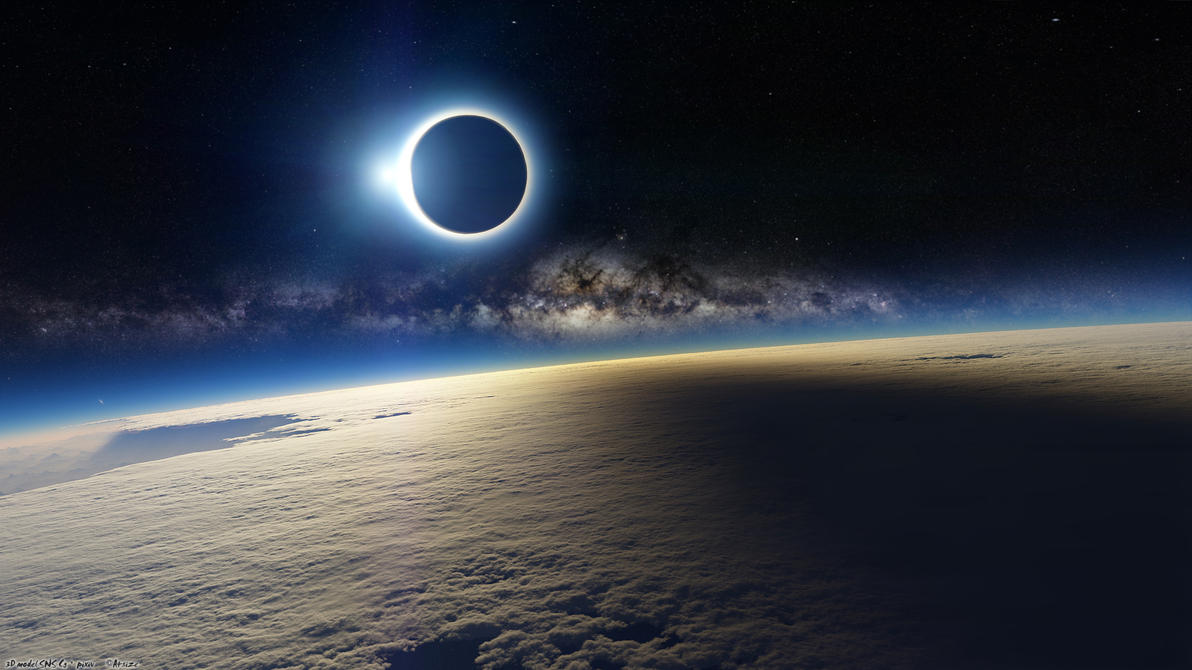
Last Sunday, an annular solar eclipse was visible across much of the US and elsewhere. I was out photographing it, like many others. A few hours after the eclipse, an image (above) started making the rounds of the internet, starting with posts on Facebook and then quickly going truly viral. It was posted as "An image of today's eclipse taken from space!" It's a marvelous image, gorgeous in every way. Just one problem...it's *not* a photo of Sunday's eclipse from space.
The image is a piece of digital art -- a combination of actual photographs from the European Space agency, some 3D modeling and rendering, and some post-processing work. It was created in 2009 by a very talented digital artist who goes by the handle ~A4size_ska (here's his web page on Deviant Art). Apparently somebody found the image on the web, and either ignorantly reposted it thinking it was a photo of the eclipse, or intentionally misrepresented it knowing that it wasn't. There are two versions being passed around the internet -- the original as above, and another where someone has edited out the Milky Way background of stars, clearly an intentional act that implies the person doing it knew the shot wasn't real, and was trying to pass it off as real anyway.
My first reaction on seeing the image was, "Wow, what a great shot!" But it only took a few seconds for me to realize that I was probably being had. First, the May 20th eclipse was an annular eclipse -- one where the apparent size of the moon is not large enough to cover the entire sun, so there should be a substantial "ring" of bright sun around the blacked-out moon, which there isn't in this image (all it shows is a bit of coronal glow). Second, the dynamic range of the image was far too great to have been an actual single photograph -- there's no way to fit the brightness levels of the sun's corona, the much dimmer shadow of the eclipse on the earth's surface, and the *much* dimmer stars all in one photo. And third, the odds of the International Space Station being in exactly the right spot to be perfectly in the eclipse's shadow are (pun intended) astronomical...not to mention that had they been in just the right spot, the moon's shadow would have been on the ISS, not the earth's surface. So it didn't take much critical analysis to realize the image was a fake, despite it being beautiful.
So I did a google search for the image, and it took me all of about 30 seconds to find ~A4size-ska's web page, where he clearly identifies it as a piece of created digital art, and not an actual photograph. I took the time to post on Facebook in comments that the image wasn't a photograph of the eclipse, and directing people to the original web page for the image. The reaction surprised me; some people wouldn't believe the image wasn't real, others actually appeared to get angry at me for "ruining" a beautiful image for them by pointing out it wasn't real! The image was popular, and beautiful, and people *wanted* it to be real -- they didn't appreciate me pointing out it wasn't.
Some other web sites had noticed the image's popularity (and non-reality), and had also started posting information about the actual image. Discovery Magazine's Blog was one of the first. Not long after, it showed up on Snopes as well. A few people began posting on ~A4size-ska's web page, letting him know the image was being misrepresented (and edited!). Still, the snowball continued to roll downhill, and even now, nearly a week later, it's still being passed around and commented on as a real photo of the May 20th eclipse.
My point in all of this? Reality in the age of digital imaging isn't always easy to spot. Even a mediocre Photoshop user can produce images with no relation to reality whatsoever, but that will fool lots of people. A really talented artist like ~A4size-ska can produce images that fool millions of people.
I have no problem at all with either fully digital art or Photoshop-modified photographs. Having wonderful digital tools to use on our images (or to create entirely synthetic ones) opens up vast worlds of artistic possibilities that no generation has had before. And I use Photoshop all the time to edit my images, even to the point of removing/replacing entire people in group shots. My point is that *if* we care whether or not an image that's being represented as real actually is real, we should take pains to critically examine it, to track down its source, and to make sure we're not being duped. Because fooling people digitally is oh-so easy today.
Let me make the point again that the artist who created this image did *not* misrespresent it as an actual photo. He produced a piece of beautiful art and posted it on his web site, clearly identifying it as what it was. It was other people, either ignorantly or intentionally, that did the misrepresentation. I love this image, it's gorgeous. But it's not what it people were claiming it was.
Incidentally, there were lots of *actual* photos of the May 20th eclipse. Here's one that actually was taken from the International Space Station, by astronaut Don Pettit:
And there were plenty of ground-based images as well, such as this series of 4 shots (all real!) that I took from my back yard:
So enjoy the gorgeous digital art created by some very talented people like ~A4size-ska. But when somebody starts claiming images like that are real, be prepared to take a look at them critically, and if they're not, call them on it.
Read more...
Last Sunday, an annular solar eclipse was visible across much of the US and elsewhere. I was out photographing it, like many others. A few hours after the eclipse, an image (above) started making the rounds of the internet, starting with posts on Facebook and then quickly going truly viral. It was posted as "An image of today's eclipse taken from space!" It's a marvelous image, gorgeous in every way. Just one problem...it's *not* a photo of Sunday's eclipse from space.
The image is a piece of digital art -- a combination of actual photographs from the European Space agency, some 3D modeling and rendering, and some post-processing work. It was created in 2009 by a very talented digital artist who goes by the handle ~A4size_ska (here's his web page on Deviant Art). Apparently somebody found the image on the web, and either ignorantly reposted it thinking it was a photo of the eclipse, or intentionally misrepresented it knowing that it wasn't. There are two versions being passed around the internet -- the original as above, and another where someone has edited out the Milky Way background of stars, clearly an intentional act that implies the person doing it knew the shot wasn't real, and was trying to pass it off as real anyway.
My first reaction on seeing the image was, "Wow, what a great shot!" But it only took a few seconds for me to realize that I was probably being had. First, the May 20th eclipse was an annular eclipse -- one where the apparent size of the moon is not large enough to cover the entire sun, so there should be a substantial "ring" of bright sun around the blacked-out moon, which there isn't in this image (all it shows is a bit of coronal glow). Second, the dynamic range of the image was far too great to have been an actual single photograph -- there's no way to fit the brightness levels of the sun's corona, the much dimmer shadow of the eclipse on the earth's surface, and the *much* dimmer stars all in one photo. And third, the odds of the International Space Station being in exactly the right spot to be perfectly in the eclipse's shadow are (pun intended) astronomical...not to mention that had they been in just the right spot, the moon's shadow would have been on the ISS, not the earth's surface. So it didn't take much critical analysis to realize the image was a fake, despite it being beautiful.
So I did a google search for the image, and it took me all of about 30 seconds to find ~A4size-ska's web page, where he clearly identifies it as a piece of created digital art, and not an actual photograph. I took the time to post on Facebook in comments that the image wasn't a photograph of the eclipse, and directing people to the original web page for the image. The reaction surprised me; some people wouldn't believe the image wasn't real, others actually appeared to get angry at me for "ruining" a beautiful image for them by pointing out it wasn't real! The image was popular, and beautiful, and people *wanted* it to be real -- they didn't appreciate me pointing out it wasn't.
Some other web sites had noticed the image's popularity (and non-reality), and had also started posting information about the actual image. Discovery Magazine's Blog was one of the first. Not long after, it showed up on Snopes as well. A few people began posting on ~A4size-ska's web page, letting him know the image was being misrepresented (and edited!). Still, the snowball continued to roll downhill, and even now, nearly a week later, it's still being passed around and commented on as a real photo of the May 20th eclipse.
My point in all of this? Reality in the age of digital imaging isn't always easy to spot. Even a mediocre Photoshop user can produce images with no relation to reality whatsoever, but that will fool lots of people. A really talented artist like ~A4size-ska can produce images that fool millions of people.
I have no problem at all with either fully digital art or Photoshop-modified photographs. Having wonderful digital tools to use on our images (or to create entirely synthetic ones) opens up vast worlds of artistic possibilities that no generation has had before. And I use Photoshop all the time to edit my images, even to the point of removing/replacing entire people in group shots. My point is that *if* we care whether or not an image that's being represented as real actually is real, we should take pains to critically examine it, to track down its source, and to make sure we're not being duped. Because fooling people digitally is oh-so easy today.
Let me make the point again that the artist who created this image did *not* misrespresent it as an actual photo. He produced a piece of beautiful art and posted it on his web site, clearly identifying it as what it was. It was other people, either ignorantly or intentionally, that did the misrepresentation. I love this image, it's gorgeous. But it's not what it people were claiming it was.
Incidentally, there were lots of *actual* photos of the May 20th eclipse. Here's one that actually was taken from the International Space Station, by astronaut Don Pettit:
And there were plenty of ground-based images as well, such as this series of 4 shots (all real!) that I took from my back yard:
So enjoy the gorgeous digital art created by some very talented people like ~A4size-ska. But when somebody starts claiming images like that are real, be prepared to take a look at them critically, and if they're not, call them on it.
Read more...
Labels:
art,
digital imaging,
eclipse,
fake photo,
May 20,
photography,
solar eclipse
Friday, May 4, 2012
What is ROES, and why should I use it?
If you're trying to make some money as a photographer, providing your clients with professional-quality prints should be one of your first priorities. If you've been using the local drugstore or big-box store for your prints, it's time to consider a professional lab, and a professional workflow: ROES software. What is ROES, and why should you use it? Read on...
If you've been ordering prints on-line and not using ROES software from a pro lab, you've been doing things the hard way (and possibly paying too much!). Most "consumer" labs (or pro labs with a consumer side business) work on the album concept; you upload entire albums of photos to their web site, and then pick prints to make from images in your album. You can only order from images in your already-uploaded albums, and uploading all images can eat up a lot of internet bandwidth. It can be difficult to make sure images will be properly sized and/or cropped, and the album interfaces range from decent to horrendous. It's geared towards the snapshooter who gets the occasional set of 4x6 prints, not for professional photographers placing large and diverse orders.
ROES stands for "Remote Order Entry System." ROES software runs on your local computer, and lets you build your order on your local computer, at your own pace. You pick the photos to be printed from your local hard drives, pick the sizes of prints you want, crop and size them, and build up an order list that the software keeps track of. Once you've got your order all put together, you let the program know your order is ready, and it takes care of uploading the images needed (and ONLY the images needed, not a whole album) and the print/crop information to the lab's servers automatically.
The image up above is from MPixPro's ROES software, and it gives you a good idea of what runs on your local computer. You can browse through any images on your computer, so you're not limited to printing only photos you've already uploaded to an "album." Pick the image file, choose a size or type of print for it, check the cropping, and place the prints on the order list. It's much quicker and more efficient than on-line "album" ordering, and it's easier to insure you're ordering everything you want to as well. MPixPro is the "professional" arm of the family of labs that started with Miller's Pro Labs, and they've been around a very long time. I don't work for them or get ads from them, I'm just a long-term satisfied customer.
To use the MPixPro ROES interface, you have to be approved as a professional with them -- different from the consumer-based MPix front end. If you have a website for your business, and are doing even part-time pro work, getting approved for an account isn't a problem. Give them a try.
The other lab I use most often is Meridian Professional Imaging, another fine lab based out of Kansas. Their version of ROES software is shown above (if it looks similar to MPixPro's, that's not a coincidence; both are written by the same software company!). Like MPixPro, you have to sign up for a professional account with Meridian, but approval is similar to MPixPro. And their ROES software provides the same advantages of ease of use, off-line building of your order, and automated uploading of your final order.
Both labs assume your images are already color-corrected and ready to print -- if you haven't calibrated your computer and monitor for accurate color, you should do so before using ROES software, as the prints will *not* be color-corrected when printed. This is a good thing, though -- it means the color and quality of your prints won't depend on the whims (or the skill) of the operator of the print equipment that day, like it is as non-professional print labs in drugstores and chain stores. And it insures absolute consistency between print runs...prints I order today will be exactly the same as prints I ordered last year. It's up to you to make them ready to print.
The quality of prints from both labs is outstanding, and customer service just as good. These are labs dedicated to producing high-quality prints for professional photographers, and that's just what they do. And because the ordering system is highly automated (using the ROES software), and they don't have to color-correct images, the prices are as good as (and often better than) drugstore prints for a much higher-quality print. You also have easy access, right in the ROES software, to the full range of products they offer -- such as canvas wraps, framed prints, press products, etc.
So if you're just getting into making money from your photography, or are looking for a way to provide high-quality prints for your clients at good prices, check out these two labs and their easy to use ROES ordering software. It'll make you more efficient, more organized, and give you better products to sell.
Some recommended labs with ROES software:
MPixPro Lab
Meridian Professional Imaging
Bay Photo Labs
White House Custom Color
Read more...
If you've been ordering prints on-line and not using ROES software from a pro lab, you've been doing things the hard way (and possibly paying too much!). Most "consumer" labs (or pro labs with a consumer side business) work on the album concept; you upload entire albums of photos to their web site, and then pick prints to make from images in your album. You can only order from images in your already-uploaded albums, and uploading all images can eat up a lot of internet bandwidth. It can be difficult to make sure images will be properly sized and/or cropped, and the album interfaces range from decent to horrendous. It's geared towards the snapshooter who gets the occasional set of 4x6 prints, not for professional photographers placing large and diverse orders.
ROES stands for "Remote Order Entry System." ROES software runs on your local computer, and lets you build your order on your local computer, at your own pace. You pick the photos to be printed from your local hard drives, pick the sizes of prints you want, crop and size them, and build up an order list that the software keeps track of. Once you've got your order all put together, you let the program know your order is ready, and it takes care of uploading the images needed (and ONLY the images needed, not a whole album) and the print/crop information to the lab's servers automatically.
The image up above is from MPixPro's ROES software, and it gives you a good idea of what runs on your local computer. You can browse through any images on your computer, so you're not limited to printing only photos you've already uploaded to an "album." Pick the image file, choose a size or type of print for it, check the cropping, and place the prints on the order list. It's much quicker and more efficient than on-line "album" ordering, and it's easier to insure you're ordering everything you want to as well. MPixPro is the "professional" arm of the family of labs that started with Miller's Pro Labs, and they've been around a very long time. I don't work for them or get ads from them, I'm just a long-term satisfied customer.
To use the MPixPro ROES interface, you have to be approved as a professional with them -- different from the consumer-based MPix front end. If you have a website for your business, and are doing even part-time pro work, getting approved for an account isn't a problem. Give them a try.
The other lab I use most often is Meridian Professional Imaging, another fine lab based out of Kansas. Their version of ROES software is shown above (if it looks similar to MPixPro's, that's not a coincidence; both are written by the same software company!). Like MPixPro, you have to sign up for a professional account with Meridian, but approval is similar to MPixPro. And their ROES software provides the same advantages of ease of use, off-line building of your order, and automated uploading of your final order.
Both labs assume your images are already color-corrected and ready to print -- if you haven't calibrated your computer and monitor for accurate color, you should do so before using ROES software, as the prints will *not* be color-corrected when printed. This is a good thing, though -- it means the color and quality of your prints won't depend on the whims (or the skill) of the operator of the print equipment that day, like it is as non-professional print labs in drugstores and chain stores. And it insures absolute consistency between print runs...prints I order today will be exactly the same as prints I ordered last year. It's up to you to make them ready to print.
The quality of prints from both labs is outstanding, and customer service just as good. These are labs dedicated to producing high-quality prints for professional photographers, and that's just what they do. And because the ordering system is highly automated (using the ROES software), and they don't have to color-correct images, the prices are as good as (and often better than) drugstore prints for a much higher-quality print. You also have easy access, right in the ROES software, to the full range of products they offer -- such as canvas wraps, framed prints, press products, etc.
So if you're just getting into making money from your photography, or are looking for a way to provide high-quality prints for your clients at good prices, check out these two labs and their easy to use ROES ordering software. It'll make you more efficient, more organized, and give you better products to sell.
Some recommended labs with ROES software:
MPixPro Lab
Meridian Professional Imaging
Bay Photo Labs
White House Custom Color
Read more...
Labels:
color,
lab,
ordering,
photography,
prints,
professional,
ROES
Thursday, April 26, 2012
Farewell, Ziggy!
This past Sunday afternoon, on a portrait photo shoot, the unthinkable happened...Ziggy died.
Who's Ziggy? My long-time associate, my partner in lighting, my trusted ally. My nine year old Sigma EF-500 DG Super Flash. Ziggy's tale is one of exploration, discovery, frustration, success, and a worldwide adventure.
I bought Ziggy new in 2003, right after I "went digital" by buying a Canon 300D Digital Rebel. I had used Sigma speedlights before, and had been happy with their combination of features and price. At the time, Sigma's EF-500 DG Super model had full Canon E-TTL compatibility at about 1/4 the cost of comparable Canon speedlights, so I picked one up. When it arrived, I named it Ziggy (a play on "Sigma"). Yes, I name inanimate objects sometimes -- that's not weird, is it? :) That's Ziggy above, with a quick and dirty home-made diffuser on his head. Cute, huh?
Ziggy and I explored the new world of digital SLR photography together. Whenever I needed something lit, Ziggy got the call. He also went around the world with me on my business travels along with the Rebel, visiting England, Scotland, Ireland, Italy, Germany, Japan, China, and Australia. He never complained, he was always ready to work, and he never gave me any problems.
In 2005, I moved up to a Canon 20D model, and Ziggy came along. I started doing early studio photos (like the one above of my two kids) -- lit by a newly-purchased AlienBees B400, and Ziggy. Yes, sometimes I used him as a slave, but he didn't seem to mind. He happily let other strobes take the lead, as long as he got to play. We learned off-camera Strobist style lighting together. He was always ready and willing to try new things!
By 2006, Ziggy had already popped his flash tens of thousands of times, with never a problem. That year was when I turned full-time pro, and Ziggy started getting a lot more of a workout. He also got some new friends, another Sigma EF-500 DG Super ("Chip"), and a Vivitar 285HV ("Dale" -- I bought the two of them at the same time). While I suspect he felt a little jealous, he always played well with the others. Together we did weddings, outdoor portrait sessions, beach shoots, macro work (image below), product shots, and more. Tens of thousands more flashes. Batteries came and went, but Ziggy was a constant.
He took some rough knocks now and then...on a beach shoot, with Ziggy mounted on a light stand and shooting into an umbrella, the wind picked up and lifted the stand, the umbrella, and Ziggy at least 15 feet in the air, then sent them all sailing down the beach, landing hard right at the water's edge. When I got to him, I was afraid he was gone -- the flash ready light was no longer on, and the umbrella was a tangled mess of bent ribs and torn fabric. But Ziggy was tough...his battery cover had simply slipped a bit, and all it took to revive him was to pop it back in place. I shot the rest of the session without the ruined umbrella, but with Ziggy!
Sigma introduced new models as the years went by -- adding E-TTL II functionality, more power, faster recycle times, etc. I kept up and bought Ziggy new friends, until last week I had Ziggy, Chip, Dale, Henry (a Sigma EF-530 DG Super), and Bruce (Sigma's latest, the EF-610 DG Super model). Bruce's guide number of 200 made Ziggy's 125 seem somewhat dated, but that didn't make him any less useful. And amazingly, he still played well in wireless E-TTL mode with all the Sigma models, over 9 years of changes.
Then, after literally dozens of weddings, many hundreds of portrait sessions, endless hours of experimentation in the studio, and much more (well over 100,000 flashes), I took Ziggy with me last Sunday. It was an outdoor session, and Ziggy was acting as key light, on a stand through a 36" shoot-through umbrella. We had done 50 or so shots, and just moved to a new location, when the shot above -- Ziggy's last -- was taken. On the shot after this, I heard a "pop" from him, and a review of the image on the camera's LCD showed Ziggy hadn't fired. Checking him out, I saw a bit of a brownish "burn" mark on his fresnel lens...his power was still on, the flash ready light glowed, but alas...his flash tube had flashed its last. Ziggy went out with a bang, both literally (it was a loud "pop!") and with the last image he helped me with.
Now, I'm only being a little bit facetious. I really do name my equipment, and when you work with things for many years you get to know them, trust them, integrate them into your thinking and planning. I knew Ziggy's capabilities inside and out, I knew what power levels to set him at, at certain distances, without having to do guide-number calculations or do test shots. How can you not become fond of hard-working, long-lasting gear that you've used for years, and that has helped you make a living and produce some great shots?
I'll miss my little buddy Ziggy. I estimate I put about 150,000 flash pops on a flash head rated for 100,000 pops, and I did it in harsh conditions, with lots of travel and bumps and falls (and flights on umbrellas!), and it just worked. Considering I paid $230 brand new for Ziggy and got just short of nine years of heavy use out of him, I consider him one heck of a bargain. How many items that you purchase nowadays last longer than they're supposed to? It's pretty rare. Ziggy rode along my original Canon Rebel 300D, a Canon 20D, a Canon 5D, a Canon XTi, and my current Canon 5D Mk II and T2i DSLRs. He worked great with all of them.
I'll be replacing Ziggy with another new Sigma EF-610 DG Super Flash from Adorama (or with a Sigma EF-610 DG SUPER Flash from Amazon
). The Sigma flashes have been great for me, never giving me any problems and standing up to hard work and a bit of unintentional abuse for many years now. I highly recommend them.
And if you happen to get one that goes along with you on your personal photographic journey, and you get a little attached to it, don't feel silly about giving it a name. It's not weird, I swear.
Read more...
Ziggy and I explored the new world of digital SLR photography together. Whenever I needed something lit, Ziggy got the call. He also went around the world with me on my business travels along with the Rebel, visiting England, Scotland, Ireland, Italy, Germany, Japan, China, and Australia. He never complained, he was always ready to work, and he never gave me any problems.
In 2005, I moved up to a Canon 20D model, and Ziggy came along. I started doing early studio photos (like the one above of my two kids) -- lit by a newly-purchased AlienBees B400, and Ziggy. Yes, sometimes I used him as a slave, but he didn't seem to mind. He happily let other strobes take the lead, as long as he got to play. We learned off-camera Strobist style lighting together. He was always ready and willing to try new things!
By 2006, Ziggy had already popped his flash tens of thousands of times, with never a problem. That year was when I turned full-time pro, and Ziggy started getting a lot more of a workout. He also got some new friends, another Sigma EF-500 DG Super ("Chip"), and a Vivitar 285HV ("Dale" -- I bought the two of them at the same time). While I suspect he felt a little jealous, he always played well with the others. Together we did weddings, outdoor portrait sessions, beach shoots, macro work (image below), product shots, and more. Tens of thousands more flashes. Batteries came and went, but Ziggy was a constant.
He took some rough knocks now and then...on a beach shoot, with Ziggy mounted on a light stand and shooting into an umbrella, the wind picked up and lifted the stand, the umbrella, and Ziggy at least 15 feet in the air, then sent them all sailing down the beach, landing hard right at the water's edge. When I got to him, I was afraid he was gone -- the flash ready light was no longer on, and the umbrella was a tangled mess of bent ribs and torn fabric. But Ziggy was tough...his battery cover had simply slipped a bit, and all it took to revive him was to pop it back in place. I shot the rest of the session without the ruined umbrella, but with Ziggy!
Sigma introduced new models as the years went by -- adding E-TTL II functionality, more power, faster recycle times, etc. I kept up and bought Ziggy new friends, until last week I had Ziggy, Chip, Dale, Henry (a Sigma EF-530 DG Super), and Bruce (Sigma's latest, the EF-610 DG Super model). Bruce's guide number of 200 made Ziggy's 125 seem somewhat dated, but that didn't make him any less useful. And amazingly, he still played well in wireless E-TTL mode with all the Sigma models, over 9 years of changes.
Then, after literally dozens of weddings, many hundreds of portrait sessions, endless hours of experimentation in the studio, and much more (well over 100,000 flashes), I took Ziggy with me last Sunday. It was an outdoor session, and Ziggy was acting as key light, on a stand through a 36" shoot-through umbrella. We had done 50 or so shots, and just moved to a new location, when the shot above -- Ziggy's last -- was taken. On the shot after this, I heard a "pop" from him, and a review of the image on the camera's LCD showed Ziggy hadn't fired. Checking him out, I saw a bit of a brownish "burn" mark on his fresnel lens...his power was still on, the flash ready light glowed, but alas...his flash tube had flashed its last. Ziggy went out with a bang, both literally (it was a loud "pop!") and with the last image he helped me with.
Now, I'm only being a little bit facetious. I really do name my equipment, and when you work with things for many years you get to know them, trust them, integrate them into your thinking and planning. I knew Ziggy's capabilities inside and out, I knew what power levels to set him at, at certain distances, without having to do guide-number calculations or do test shots. How can you not become fond of hard-working, long-lasting gear that you've used for years, and that has helped you make a living and produce some great shots?
I'll miss my little buddy Ziggy. I estimate I put about 150,000 flash pops on a flash head rated for 100,000 pops, and I did it in harsh conditions, with lots of travel and bumps and falls (and flights on umbrellas!), and it just worked. Considering I paid $230 brand new for Ziggy and got just short of nine years of heavy use out of him, I consider him one heck of a bargain. How many items that you purchase nowadays last longer than they're supposed to? It's pretty rare. Ziggy rode along my original Canon Rebel 300D, a Canon 20D, a Canon 5D, a Canon XTi, and my current Canon 5D Mk II and T2i DSLRs. He worked great with all of them.
I'll be replacing Ziggy with another new Sigma EF-610 DG Super Flash from Adorama (or with a Sigma EF-610 DG SUPER Flash from Amazon
And if you happen to get one that goes along with you on your personal photographic journey, and you get a little attached to it, don't feel silly about giving it a name. It's not weird, I swear.
Read more...
Labels:
9 years,
flash,
photography,
review,
Sigma EF Super,
speedlight
Friday, April 6, 2012
Five Photography Books That will Make You Better
Light Science & Magic, by Fil Hunter, Paul Fuqua and Steven Biver
THE reference guide to photographic lighting. Whether you're new at using artificial light, or an old hand, there's plenty to learn in this outstanding book. This one tops my list of books that make a difference simply because it made the most difference in my own lighting. The authors not only give you "standard" lighting setups, but clearly and entertainingly let you know why they're standards, why they work, how to tweak them, and the science behind them. They cover tough topics such as lighting metal and glass, how to manage reflections from shiny surfaces, and much more. Organized as chapters on specific lighting challenges and how to solve them, it's also an excellent step-by-step tutorial on using light to solve problems in your photos. What you'll take away from this book isn't just a bunch of lighting setups...you'll come away understanding how light works and how to control it in any situation. If you're only ever going to buy one lighting book, this is the one.
Light It, Shoot It, Retouch It! by Scott Kelby
Best known for his Photoshop expertise (he's the editor and publisher of Photoshop User magazine), Kelby is also a top-rate photographer. What's different about this book is that Kelby takes you step-by-step through a series of images -- starting with what he wants to accomplish, the lighting setup, the equipment used, the shoot itself, and finally a full post-processing explanation. The gear he uses is sensible and within the reach of most amateurs, and not super-high cost gear that most of us can only dream about. And his clear, personal writing style gives you the impression he's right there with you, mentoring you through your own shoots. Each setup is also accompanied by full photos of the entire setup, from light stands to subjects to camera, rather than sometimes hard to decipher lighting diagrams. A great way to see how an accomplished pro approaches photographic problems and challenges, and solves them step by step.
On-Camera Flash Techniques for Digital Wedding and Portrait Photography, by Neil van Niekerk
While the first two books on my list mainly concentrate on studio lighting and photography, this one concentrates almost entirely on making on-camera flash not *look* like on-camera flash. It it succeeds wonderfully. Let's face it -- at weddings and many other fast-moving events we're asked to photograph, you're likely not going to ever be able to set up light stands with monolights on them, use big diffusers, or many other "studio" technqiques -- you'll be using on-camera flash. Neil gives some amazingly innovative solutions to making the most of such situations (I have to admit I probably never would have thought of bouncing light off a building 30 feet away), and making these shots look more natural and more professional. I use many of his tips at every wedding I shoot.
The Hot Shoe Diaries: Big Light from Small Flashes, by Joe McNally
Logically following after the previous book, McNally's fine work combines some of the setups and techniques from studio work with the speed and portability of on-camera flash; the result is a Strobist love fest, with McNally's work supplying most of the love. Joe himself is amazingly self-deprecating for such a master of lighting and photography, and the book is both funny and instructive while never seeming arrogant. This book is at #4 on my list only because this is pretty much (with the exception being the next one) the order in which I bought them, and how my own lighting progressed...by the time I got Joe's book, I had a good grounding in studio lighting, and so some of Joe's "crazy" ideas didn't seem quite so crazy, and actually made some sense based on that experience. It's just that at the time I hadn't really considered doing much of what he does with speedlights! And if you're a Canon shooter like me, don't hold Joe's Nikons against him...most of what he teaches will work with any camera and flash.
Adobe Photoshop CS5 for Photographers, by Martin Evening
OK, strictly speaking this isn't a "photography" book. It is, however, the absolute best resource I've found for learning how to handle your images after the photography is over. While Kelby's book above is a great beginning for post-processing photos in Photoshop, this takes you from beginning to end -- I have yet to come across an image editing/processing problem that this book doesn't cover. And in case you were wondering, yes -- it's huge. Don't let that intimidate you if you're just getting into using Photoshop -- Martin gently leads you from the simple to the complex, and all with excellent actual examples from his own photographic work. A combination reference work and tutorial, if you use Photoshop, you need this book. Of the five books here, this was actually the first one that I purchased...it goes at the last because, well, that's where post-processing belongs, right? Highly recommended.
These are five books that really made a difference in my own photography; if you're serious about improving your own work, from studio to location lighting, from exposing to post-processing, these will make a difference in yours, too.
Read more...
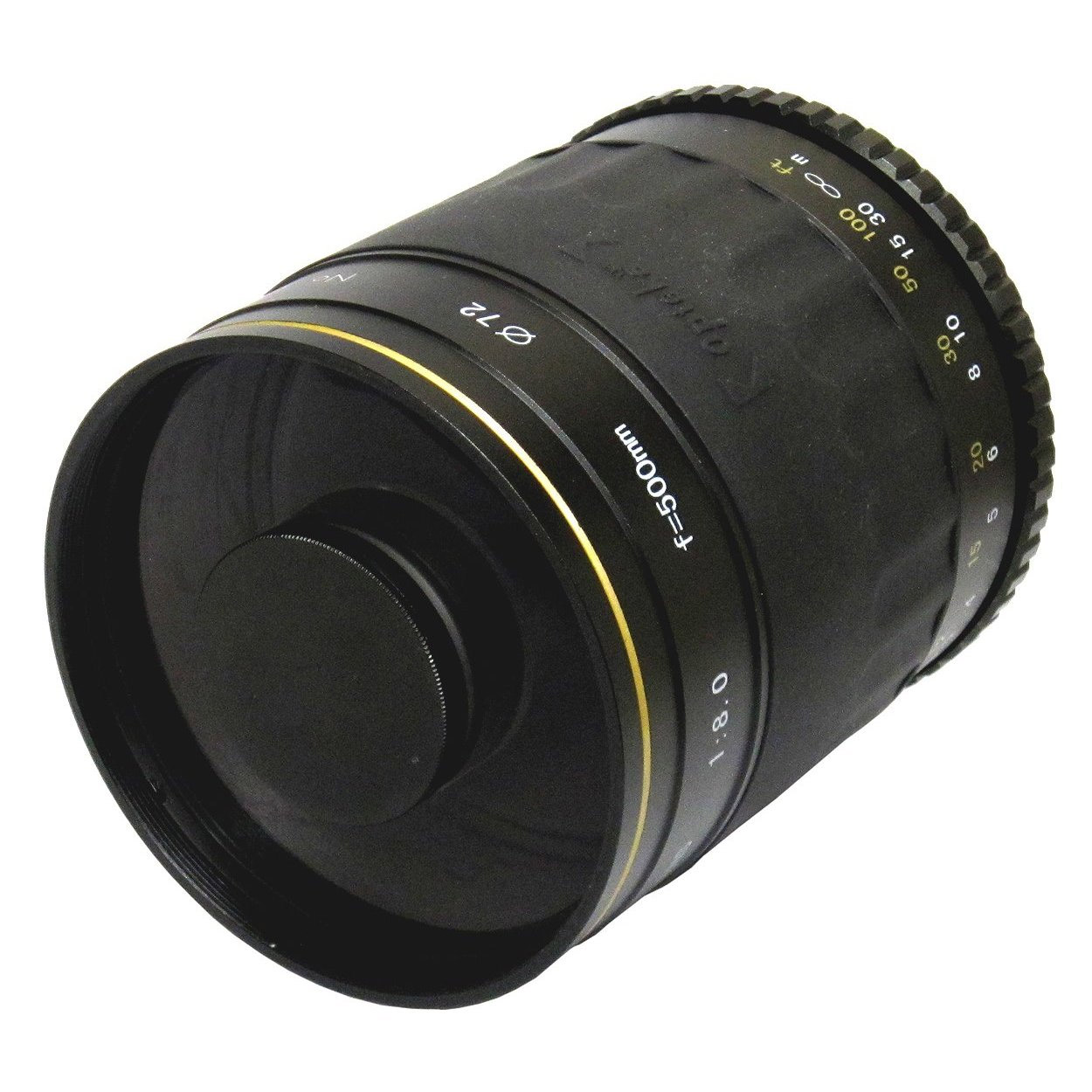
Labels:
books,
learning,
photography,
professional,
tips,
tricks,
tutorials
Subscribe to:
Posts (Atom)